
Calculator Launcher
AtomApplicationsTools
4.13.82K Reviews
- Version
- 3.20.0
- Installs
- 1.00M
- Age Rating
- Everyone
Screenshots
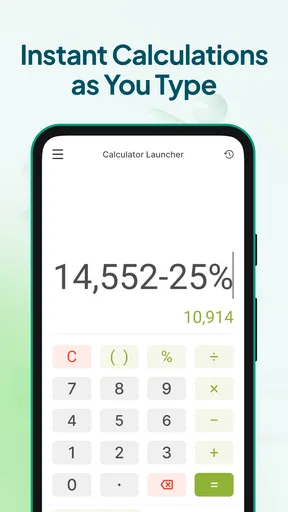
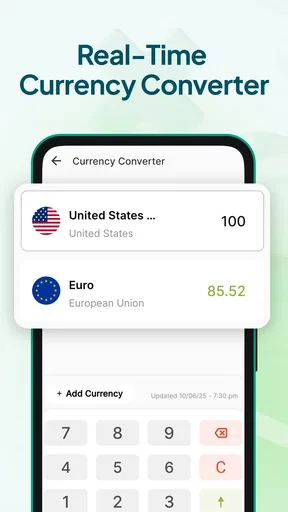
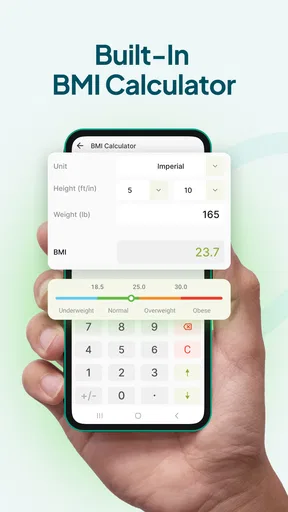
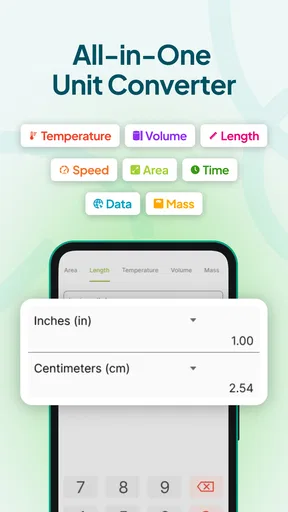
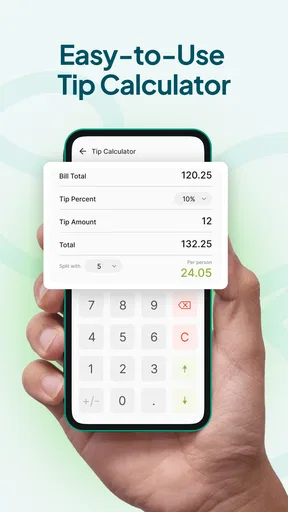
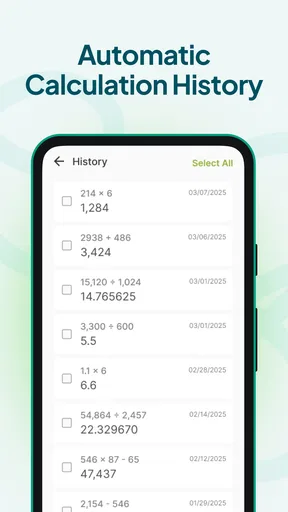
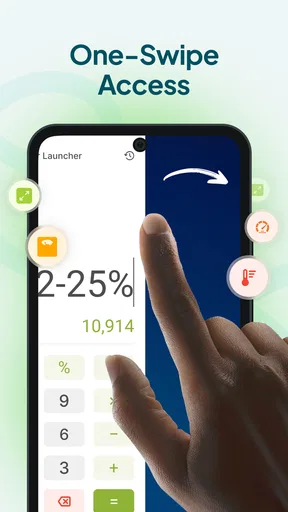

Our Review of Calculator Launcher
 Analysis by Appyee
I like tools that remove one small annoyance from my day, and Calculator Launcher is built around exactly that idea. Instead of making me search through a crowded app drawer when I need to work out a price, convert a measurement, or check a quick figure, it puts those calculations close to the starting point of my phone workflow. After using it as a lightweight utility rather than a full mathematical workspace, I found its appeal easy to understand: it is about reducing the distance between thinking “I need to calculate this” and seeing the answer.
That focused approach also explains why I would not recommend it to everyone. People who need advanced scientific functions, long calculation histories, graphing, or a complete finance tool will probably feel more comfortable with a conventional calculator or a dedicated specialist app. For quick everyday arithmetic and unit conversions, though, this free Tools app from AtomApplications has a practical personality. It is rated 4.1 on average from around 14 thousand ratings, has passed one million installs, and is suitable for everyone.
How Calculator Launcher fits into everyday use
The name is important because this is not simply trying to be another calculator icon. The useful part is the launcher concept: calculations are intended to be reached quickly, without turning a simple question into a multi-step search. I found that most valuable when I was already doing something else, such as comparing two prices, checking how much paint I might need, or converting a measurement while reading instructions.
A normal calculator is perfectly adequate once it is open. The friction usually happens before that. I have to leave the current task, locate the right icon, wait for the app, and then enter the numbers. Calculator Launcher is more appealing when the calculation is a brief interruption rather than the main activity. It encourages a “calculate and move on” habit, which is exactly what I want from a small utility.
Its unit-conversion focus makes it more useful than a basic four-function calculator for ordinary household decisions. Converting between familiar measurement systems, checking quantities in recipes, or translating a distance into a form that makes more sense to me can all happen in the same general workflow. I would still verify an important professional measurement elsewhere, but for casual planning the convenience is clear.
One realistic example is shopping for a product sold in a different size or quantity. I can compare the displayed amount with what I already have at home, calculate a per-unit cost, and convert the relevant measurement without opening several unrelated tools. The value is not that any individual operation is difficult. The value is keeping a chain of small decisions together.
A useful companion for short calculations
I see the app as a companion to other apps rather than a replacement for them. While reading a message, browsing a product page, or planning a trip, I may need a result for only a few seconds. A launcher-style calculator makes more sense in those moments than a feature-heavy mathematical package that expects me to build a whole session around the problem.
There is also a mental benefit to keeping these tasks separate. When I use a general calculator for everything, I sometimes lose track of whether I am doing arithmetic, converting units, or recording a final result. A focused utility gives the calculation a clear purpose. I can perform it, use the answer in the original task, and return to what I was doing.
That said, quick access does not automatically make every operation faster. If I already have a calculator open, switching to another tool adds unnecessary movement. The launcher is most helpful at the beginning of a task, not after I have already settled into a longer calculation. That distinction matters when deciding whether it deserves a regular place in a phone routine.
What the current release tells me
The current version is 3.20.0, while the app was released on October 17, 2023. Those details suggest a product that has had time to move beyond its first rough concept, but I would not treat a version number alone as proof of a major redesign or a particular feature set. What I can judge directly is the current experience: it remains centered on fast calculations and conversions rather than expanding into an all-purpose productivity suite.
That restraint is one of its strengths. Many utilities become harder to use when they collect unrelated functions, settings, and panels. Here, the basic purpose stays understandable. I do not need to learn a large system before getting value from it. The product evolution appears to have preserved the original quick-access idea instead of burying it under extra ambition.
For existing users, a current release like this is reassuring mainly because it gives the app a defined present state to evaluate. Someone returning to it after an earlier installation should judge the interface and workflow they see now, rather than relying on memories of an older calculator. I would still suggest spending a few minutes testing the actions you personally need before making it part of an important routine.
The update story also creates a reasonable expectation of refinement, not a promise of every advanced feature. I would look for smoother entry, clearer conversion handling, and fewer interruptions in future versions. I would not assume that the app is turning into a scientific calculator, a spreadsheet, or a financial planner unless those capabilities are clearly introduced later.
Small workflows that make it more useful
My first tip is to decide what counts as a “quick” calculation before relying on the app. If the answer should be used immediately in another task, Calculator Launcher is a natural fit. If I expect to revisit a series of figures later, I prefer to write them down or use a tool designed around saved work. This simple boundary prevents disappointment and keeps the app in the role where it performs best.
A second useful habit is to separate conversion from comparison. I can first convert the quantity into the unit that makes sense to me, then perform the price or size comparison. Doing both mentally at once is where mistakes creep in. The app’s value is not only speed; it also lets me break a vague question into two visible steps.
Third, I would use it as a checkpoint when copying numbers from another screen. Before entering a long figure into a form, invoice, shopping note, or message, I can calculate it separately and compare the result with my estimate. This is especially useful for percentages, totals, and quantities where a misplaced decimal can change the outcome. A quick independent check is often more valuable than a collection of advanced functions I never touch.
Another trade-off is that launcher convenience depends on the way I use my phone. If my home screen is already crowded or I prefer searching by voice, the app may not feel faster than the built-in options. If I often perform calculations while moving between apps, however, the dedicated access point can become a small but noticeable improvement. The best result comes from placing it where I naturally begin short tasks, not from forcing every calculation through it.
Where it compares well with ordinary alternatives
The built-in calculator on a phone usually wins for familiarity. It is already present, and I do not need to decide whether a separate utility deserves space. For basic addition, subtraction, multiplication, and division, that may be enough. Calculator Launcher earns its place when the entry point and conversion workflow are more important than simply having a keypad.
A web search can also answer many conversion questions, but it introduces a different kind of friction. I have to open a browser, phrase the request, inspect the result, and possibly deal with unrelated pages. A dedicated calculator tool feels cleaner for repeated everyday use. It keeps a simple task from becoming a search session.
Specialist calculator apps are the better choice for students, engineers, tradespeople, or anyone who needs a sustained technical workspace. They may offer deeper mathematical functions, structured history, formulas, or visual output. Calculator Launcher’s advantage is the opposite: it avoids making a small task feel like a technical project. Choosing between them depends on whether I value breadth or immediate simplicity.
There is also a difference between this app and a notes app. Notes are better for preserving assumptions, source figures, and explanations. Calculator Launcher is better for producing the answer quickly. For a household budget or a renovation plan, I would often use both: calculate the individual figure in the utility, then record the meaningful result and context in my notes.
Limitations I noticed in the concept
The focused design can feel narrow once a calculation becomes complicated. I would not choose it as my only tool for multi-step work that needs a durable record. If I need to return to the exact sequence later, a calculator with a strong history function or a spreadsheet is more appropriate. The quick-launch idea helps me start, but it does not by itself solve the problem of documenting a process.
Unit conversion can also create false confidence. A converted number may be mathematically correct while still being unsuitable for a real-world decision because of rounding, context, or the difference between similar units. I would use the app for planning and checking, then confirm critical measurements using the instructions or standards that govern the task.
Another limitation is personal habit. People who rarely calculate anything beyond a tip or a simple total may not notice much improvement over the phone’s existing calculator. Installing a dedicated utility only makes sense when quick access or conversions occur often enough to justify another tool. Free availability removes the financial barrier, but it does not remove the need for a useful place in my routine.
I also think the app is less suitable for users who want a visually rich learning environment. A focused launcher is designed to get out of the way. It does not need to explain every mathematical idea or guide a beginner through a lesson. Someone learning algebra, working through statistics, or checking formulas would benefit more from an educational or specialist application.
Who should try it, and who should skip it
I would recommend Calculator Launcher to people who regularly pause during ordinary tasks to calculate a total or convert a quantity. It is particularly suitable for shoppers, home cooks, travelers, renters, and anyone who moves between measurement systems. It can also help people who dislike keeping several small utilities open and want one obvious place to handle quick numerical interruptions.
It is a good match for someone who values speed over a large feature list. The free price makes it easy to test without committing money, and the Everyone age rating means it is positioned as a broadly accessible tool rather than something aimed at a specialist audience. The minimum operating system is Android 10, so users on older devices should check compatibility before planning around it.
I would skip it if my main requirement is advanced mathematics, detailed calculation history, graphing, or a permanent project record. I would also skip it if the built-in calculator already gives me the access and conversions I need. In that case, the extra installation may add clutter rather than remove it.
The developer, AtomApplications, has kept the product identity easy to understand: a calculator that is meant to be reached quickly. Its audience size, with over one million installs, shows that the idea has broad practical appeal, but popularity is not a substitute for personal fit. The important question is whether my own daily tasks contain enough small calculations to make the shortcut meaningful.
What I would watch in future updates
As the app continues to evolve, I would pay attention to whether new capabilities improve the quick workflow or make it feel heavier. Better handling of repeated conversions, clearer ways to correct an entry, and a smoother return to the original task would all strengthen the central idea. Those changes would be useful because they reduce friction without changing what the app is for.
I would also watch how the product balances convenience with trust. Calculations are simple, but users still need confidence that inputs, units, and results are presented clearly. Any future expansion should make mistakes easier to spot, not merely add more choices. For me, readable results and predictable behavior matter more than a long list of functions.
Existing users should evaluate updates by asking whether their everyday workflow is genuinely faster. A new feature is worthwhile when it removes a step I repeatedly perform, not simply because it appears in a release note. New users can take the same approach: try a few real tasks, including one conversion and one multi-step total, then decide whether the app feels more convenient than the tools already on the phone.
My overall view is positive but deliberately specific. Calculator Launcher is strongest as a fast doorway to small calculations and unit conversions, not as a replacement for every calculator-related tool. I appreciate its narrow purpose because it keeps ordinary numerical tasks from becoming unnecessarily complicated. If that is the kind of friction I regularly encounter, I would recommend giving it a place in my routine. If I need depth, history, or technical mathematics, I would choose a more specialized alternative instead.
After using it, I would describe the app to a friend as a practical shortcut rather than a complete mathematical workstation. That is not a criticism; it is the key to using it well. Keep it for quick decisions, comparisons, and conversions, and it can quietly save time. Expect it to manage a long technical project, and its deliberately simple design will feel limiting.
Verdict
Strengths of Calculator Launcher
- Opens calculations quickly from the launcher or home screen.
- Supports basic arithmetic without requiring an internet connection.
- Minimal interface makes common operations easy to access.
- Useful for checking quick totals while using other apps.
- Consumes little storage and battery during normal use.
Limitations of Calculator Launcher
- Advanced scientific and graphing functions may be limited.
- Launcher access can feel unnecessary if your phone already has a calculator.
- May require extra permissions depending on the device and setup.
- Small buttons can make fast typing difficult on compact screens.
- Ads or premium features may affect the experience in some versions.
Other Releases by AtomApplications
View All
QR & Barcode Scanner Launcher
Tools4.2

Brightest Flashlight Launcher
Tools4.3

2026 Calendar Launcher
Productivity4.4

Alarm Clock Launcher
Productivity4.3
Similar Picks in This Category
View All
Google LLC4.0

Gboard - the Google Keyboard
Google LLC4.5

Google Play services
Google LLC4.3

Google Play Store
Google LLC4.9

Files by Google
Google LLC4.5

SHAREit: Transfer, Share Files
Smart Media4U Technology Pte.Ltd.4.3
Frequently Asked Questions
What is Calculator Launcher and how does it work?
Calculator Launcher is a utility app designed to give you quick access to a calculator from your device’s launcher or home screen. After installation, it can be opened like a regular app and, depending on the version and device, may also be assigned as a shortcut or launcher action. It is mainly intended for fast everyday calculations rather than advanced scientific or financial work.
What calculation features are included in Calculator Launcher?
The app generally focuses on basic calculator functions such as addition, subtraction, multiplication, division, percentages, decimals, and clearing entries. Its simplicity makes it convenient for shopping, budgeting, schoolwork, and quick checks. Users looking for graphing, unit conversion, equation solving, or advanced scientific operations should review the specific store listing, because available features can vary between versions.
Does Calculator Launcher work without an internet connection?
Yes, the core calculator functionality should normally work offline because calculations are processed directly on the device. An internet connection may still be required for downloading the application, receiving updates, loading advertising content, or accessing external support and privacy information. If offline access is important to you, test the app after installation with Wi-Fi and mobile data disabled.
Is Calculator Launcher free to download, and does it contain advertisements?
Calculator Launcher may be available as a free download, but the exact business model depends on the Android or iOS version and the developer’s current release. Some editions may display advertisements, offer optional purchases, or include limitations that can be removed through an upgrade. Check the official store page before downloading for current pricing, in-app purchase details, and advertising disclosures.
Is Calculator Launcher safe and compatible with my device?
The safest option is to download Calculator Launcher from the official Google Play Store or Apple App Store and verify the developer name, ratings, permissions, and recent update history. A calculator should not normally need access to sensitive features such as contacts, messages, or location. Compatibility depends on your operating system version and device model, so review the listed requirements before installation.
